C++ Functions
A function is a block of code that performs a specific task.
Suppose we need to create a program to create a circle and color it. We can create two functions to solve this problem:
- a function to draw the circle
- a function to color the circle
Dividing a complex problem into smaller chunks makes our program easy to understand and reusable.
There are two types of function:
- Standard Library Functions: Predefined in C++
- User-defined Function: Created by users
In this tutorial, we will focus mostly on user-defined functions.
C++ User-defined Function
C++ allows the programmer to define their own function.
A user-defined function groups code to perform a specific task and that group of code is given a name (identifier).
When the function is invoked from any part of the program, it all executes the codes defined in the body of the function.
C++ Function Declaration
The syntax to declare a function is:
returnType functionName (parameter1, parameter2,...) {
    // function body
}
Here's an example of a function declaration.
// function declaration
void greet() {
    cout << "Hello World";
}
Here,
- the name of the function is
greet() - the return type of the function is
void - the empty parentheses mean it doesn't have any parameters
- the function body is written inside
{}
Note: We will learn about returnType and parameters later in this tutorial.
Calling a Function
In the above program, we have declared a function named greet(). To use the greet() function, we need to call it.
Here's how we can call the above greet() function.
int main() {

    // calling a function
    greet();

}
Example 1: Display a Text
#include <iostream>
using namespace std;

// declaring a function
void greet() {
    cout << "Hello there!";
}

int main() {

    // calling the function
    greet();

    return 0;
}
Output
Hello there!
Function Parameters
For example, let us consider the function below:
void printNum(int num) {
    cout << num;
}
Here, the int variable num is the function parameter.
We pass a value to the function parameter while calling the function.
int main() {
    int n = 7;

    // calling the function
    // n is passed to the function as argument
    printNum(n);

    return 0;
}
Example 2: Function with Parameters
// program to print a text

#include <iostream>
using namespace std;

// display a number
void displayNum(int n1, float n2) {
    cout << "The int number is " << n1;
    cout << "The double number is " << n2;
}

int main() {

     int num1 = 5;
     double num2 = 5.5;

    // calling the function
    displayNum(num1, num2);

    return 0;
}
Output
The int number is 5
The double number is 5.5
In the above program, we have used a function that has one int parameter and one double parameter.
We then pass num1 and num2 as arguments. These values are stored by the function parameters n1 and n2 respectively.
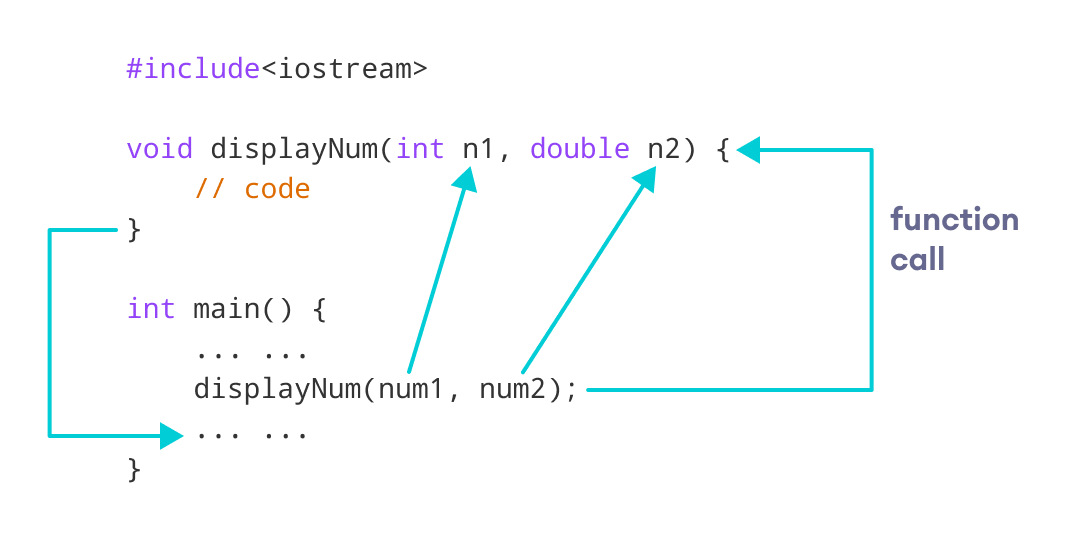
Note: The type of the arguments passed while calling the function must match with the corresponding parameters defined in the function declaration.
Return Statement
In the above programs, we have used void in the function declaration. For example,
void displayNumber() {
    // code
}
This means the function is not returning any value.
It's also possible to return a value from a function. For this, we need to specify the returnType of the function during function declaration.
Then, the return statement can be used to return a value from a function.
For example,
int add (int a, int b) {
   return (a + b);
}
Here, we have the data type int instead of void. This means that the function returns an int value.
The code return (a + b); returns the sum of the two parameters as the function value.
The return statement denotes that the function has ended. Any code after return inside the function is not executed.
Example 3: Add Two Numbers
// program to add two numbers using a function

#include <iostream>

using namespace std;

// declaring a function
int add(int a, int b) {
    return (a + b);
}

int main() {

    int sum;

    // calling the function and storing
    // the returned value in sum
    sum = add(100, 78);

    cout << "100 + 78 = " << sum << endl;

    return 0;
}
Output
100 + 78 = 178
In the above program, the add() function is used to find the sum of two numbers.
We pass two int literals 100 and 78 while calling the function.
We store the returned value of the function in the variable sum, and then we print it.
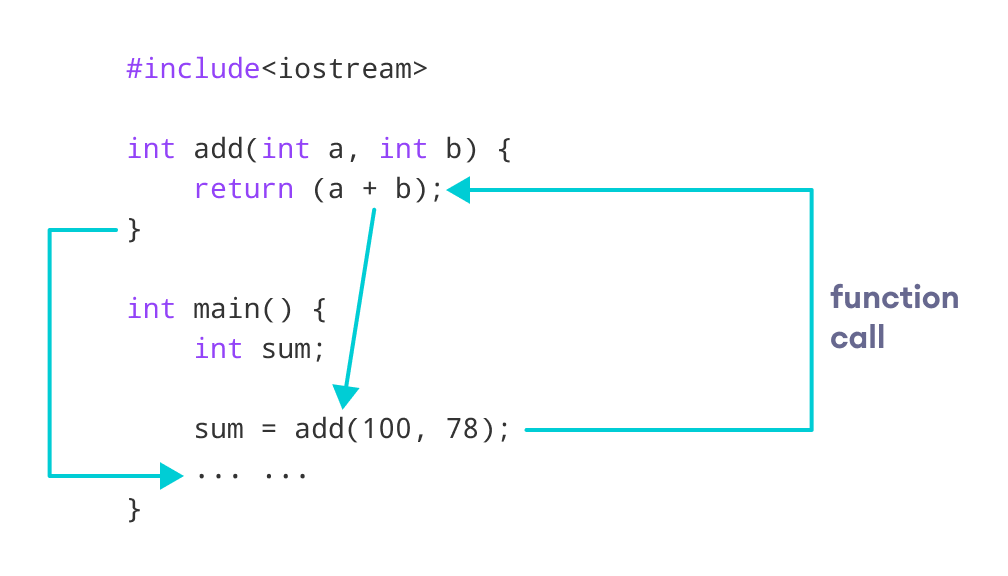
Notice that sum is a variable of int type. This is because the return value of add() is of int type.
Function Prototype
In C++, the code of function declaration should be before the function call. However, if we want to define a function after the function call, we need to use the function prototype. For example,
// function prototype
void add(int, int);

int main() {
    // calling the function before declaration.
    add(5, 3);
    return 0;
}

// function definition
void add(int a, int b) {
    cout << (a + b);
}
In the above code, the function prototype is:
void add(int, int);This provides the compiler with information about the function name and its parameters. That's why we can use the code to call a function before the function has been defined.
The syntax of a function prototype is:
returnType functionName(dataType1, dataType2, ...);Example 4: C++ Function Prototype
// using function definition after main() function
// function prototype is declared before main()

#include <iostream>

using namespace std;

// function prototype
int add(int, int);

int main() {
    int sum;

    // calling the function and storing
    // the returned value in sum
    sum = add(100, 78);

    cout << "100 + 78 = " << sum << endl;

    return 0;
}

// function definition
int add(int a, int b) {
    return (a + b);
}
Output
100 + 78 = 178
The above program is nearly identical to Example 3. The only difference is that here, the function is defined after the function call.
That's why we have used a function prototype in this example.
Benefits of Using User-Defined Functions
- Functions make the code reusable. We can declare them once and use them multiple times.
- Functions make the program easier as each small task is divided into a function.
- Functions increase readability.
C++ Library Functions
Library functions are the built-in functions in C++ programming.
Programmers can use library functions by invoking the functions directly; they don't need to write the functions themselves.
Some common library functions in C++ are sqrt(), abs(), isdigit(), etc.
In order to use library functions, we usually need to include the header file in which these library functions are defined.
For instance, in order to use mathematical functions such as sqrt() and abs(), we need to include the header file cmath.
Example 5: C++ Program to Find the Square Root of a Number
#include <iostream>
#include <cmath>
using namespace std;

int main() {
    double number, squareRoot;

    number = 25.0;

    // sqrt() is a library function to calculate the square root
    squareRoot = sqrt(number);

    cout << "Square root of " << number << " = " << squareRoot;

    return 0;
}
Output
Square root of 25 = 5
In this program, the sqrt() library function is used to calculate the square root of a number.
The function declaration of sqrt() is defined in the cmath header file. That's why we need to use the code #include <cmath> to use the sqrt() function.
To learn more, visit C++ Standard Library functions.
Comments
Post a Comment